How do I set pickup days and close orders on time?
How to Set Pickup Dates and Order Deadlines
In BakePorch, you can create a bake date with a menu, pickup windows and an order deadline. Customers see the available options, while the cutoff gives you time to prepare.
Start freeFree to start · No monthly fee
How it works
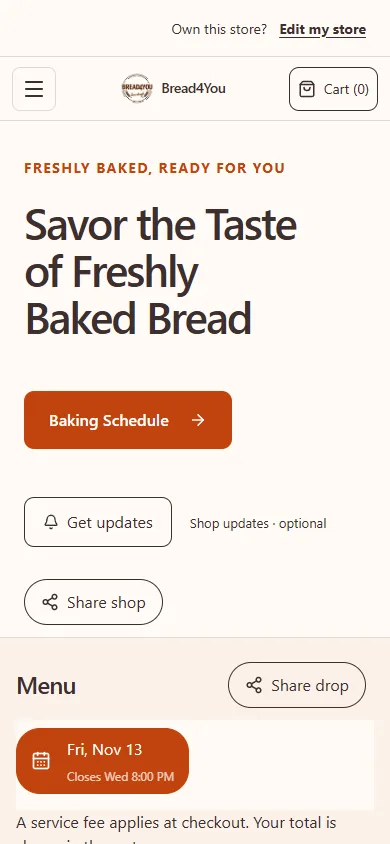
Here is an example using Bread4You’s real storefront, captured in November 2026. Its menu and dates can change.
1. Set up your shop
Create your shop and add the products you want to sell.
2. Plan your sale
Choose the available products, pickup details and order deadline.
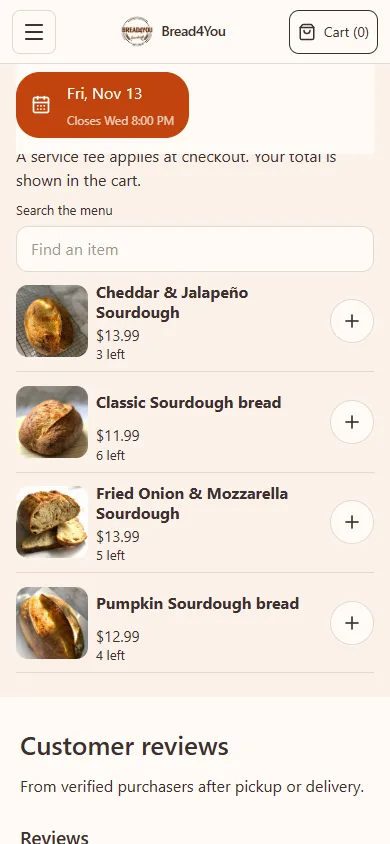
3. Share your menu
Share your public link so customers can choose their items and review pickup.
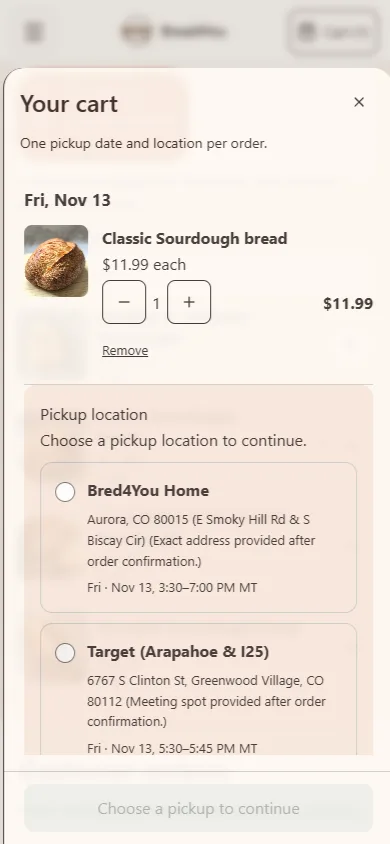
Separate the three times involved
First is the order cutoff: the last point at which you accept orders for that sale. Second is the preparation schedule you use internally. Third is the pickup window: the start and end of the customer's collection period. The cutoff should leave enough time for the work between ordering and handover.
For example, a scheduled bread sale might close orders Thursday at 6 p.m. and offer collection Saturday from 10 a.m. to noon. The customer orders by Thursday and collects on Saturday. These are illustrative times, not a recommended production or food-storage schedule for your products.
- Order by: Thursday, [date], 6 p.m. [timezone].
- Collect: Saturday, [date], 10 a.m.–noon.
- Pickup: the location selected from the available choices.
For a scheduled batch, open the date and its menu
In BakePorch, create the bake date, set the cutoff and pickup start and end times, then assign the actual products and options. Review prices, total sellable quantities and any per-order purchase limits. A product in the library does not become available on a scheduled date until it is assigned to that menu.
Add active pickup locations and the windows you will actually fulfill. One bake can offer more than one location or window. Those pickup locations share the bake's product capacity; adding another location is not a reason to assume the quantity has doubled.
All bake-date settings use the bakery timezone. Review it in Business & ordering, and include the timezone in a manual announcement if customers might be unsure. Save the date as open only after reviewing the menu, food information and public ordering readiness. Draft dates stay private.
A quantity limit and a cutoff answer different questions
The cutoff answers when you stop accepting orders. Product capacity answers how many units you can sell. A menu can sell out before its cutoff, or reach the cutoff with quantity left. Set each from your actual plan rather than expecting one to replace the other.
A per-order limit is another setting: it limits what one order can buy, rather than setting the sale's total capacity. Check pack sizes carefully. If one item is a six-pack, a quantity of four is four packs, not four individual cookies.
Review the whole-bake prep and packing totals before relying on your plan. Where customers can buy multiple packs in one order, product units and handovers are different counts. Do not invent pickup capacity from a product stock number.
Made-to-order uses a different availability plan
For made-to-order menu products, review advance notice, booking horizon, unavailable dates, daily workload capacity and configured fulfillment windows. Product preparation settings can also affect which dates a customer can choose. Turning on made-to-order does not, by itself, establish that ordering is open.
A product can use more than one selling method. Closing or selling out its scheduled batch does not necessarily close its made-to-order availability. If you want all sales of that product to pause, review every enabled selling method rather than only the scheduled date.
Scheduled batches described here are pickup sales. BakePorch also supports configured seller-managed delivery for made-to-order and custom orders. Do not advertise batch delivery merely because delivery is available through another ordering path.
Check changes against the actual orders
Review existing orders before changing an open sale's window or location. Do not assume an edited setting has notified every customer. Check the order record and communicate any accepted correction clearly.
Before sharing the menu, open the public store on a phone and check the product, quantity, available pickup selection and final review details. Before production, refresh the whole-bake list and reconcile accepted changes and payment status. Before handover, use the order number and selected location to match the package.
Keep the announcement short: the menu, the order-by date and time, the collection date and window, and the way to order. A customer should be able to distinguish the ordering deadline from pickup without asking you in a message.
What does it cost?
Free to start, with no monthly fee. A small service fee is added at customer checkout. Payments go to your own Square account.
The customer pays the BakePorch fee by default, or you can choose to cover it. Your business pays Square processing separately. See pricing and examples.
Who is it for?
Home bakers, cottage food sellers, meal-prep businesses and other home cooks can use drops, made-to-order menus and custom requests to organize their sales. Choose the approach that fits your business and check the food rules that apply to you.
Questions sellers ask
Does reaching the order cutoff cancel existing orders?
The cutoff stops accepting new orders for the scheduled date. Keep reviewing the accepted orders and their agreed pickup details; do not treat the cutoff as cancellation or fulfillment.
Can I have two pickup locations on the same bake date?
BakePorch supports multiple active pickup locations and windows for a bake. They share the bake's product capacity, so review the combined quantities and location packing lists.
How much is the fee?
The standard BakePorch service fee is 5% of the order subtotal, including delivery charges where applicable. By default the customer pays it, or you can choose to cover it. Square processing fees are separate and are paid by your business.
Is there a free app I can make for my shop?
BakePorch is free to start with no monthly fee. Card orders have a service fee and your business pays Square processing separately.
Can I offer different pickup locations?
Yes. Add locations and choose the pickup options available for your sale. Check that the right dates, times and locations appear before sharing your link.
Can I offer custom orders?
Yes. Customers can send a request for you to review. You can then offer a quote for the customer to accept and pay.
More practical guides
Ready to take your next order?
Build your menu and review your store before publishing.
Start free