How can I take pre-orders without managing every DM?
Take Pre-Orders Without DMs or Google Forms
BakePorch gives you one menu link to share instead of collecting every pre-order in messages. Customers choose available items and pickup details, and can pay by card when your store is ready.
Start freeFree to start · No monthly fee
How it works
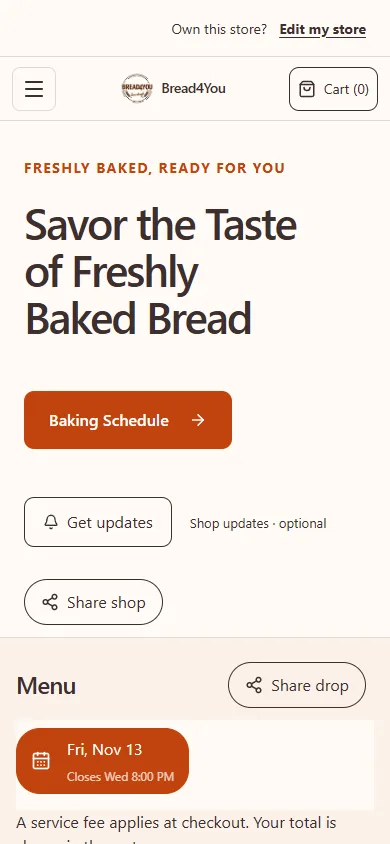
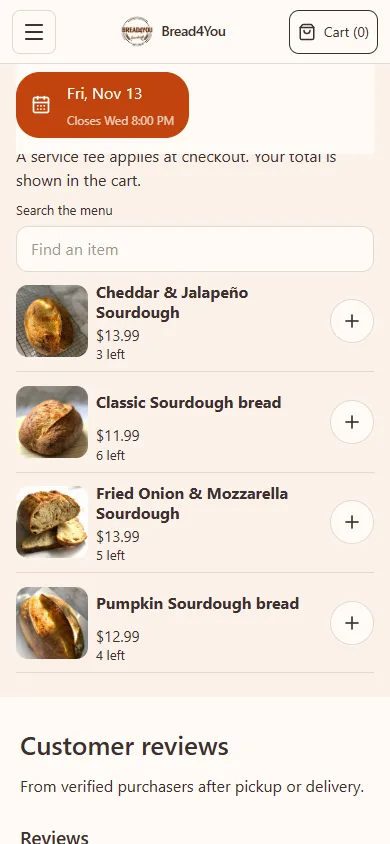
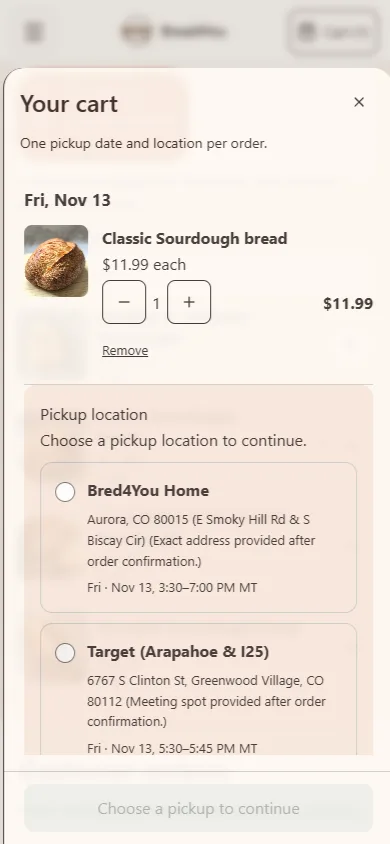
Here is an example using Bread4You’s real storefront, captured in November 2026. Its menu and dates can change.
1. Set up your shop
Create your shop and add the products you want to sell.
2. Plan your sale
Choose the available products, pickup details and order deadline.
3. Share your menu
Share your public link so customers can choose their items and review pickup.
Put the whole offer in one place
Start with a menu small enough to fulfill confidently. For each item, state the pack size, price and information the customer needs to decide. Six cookies and a dozen cookies should be distinct choices if you sell both. Add your own accurate product photos and review the food information before opening orders.
Then set the sale's ordering cutoff and available pickup options. A customer should not need to send three messages to find the day, the area and whether you can still accept the order. If you offer several pickup locations, make the available choices clear rather than asking customers to invent one in a note.
Define what makes an order confirmed
Decide your payment expectations before you share the menu. For a pay-ahead sale, say that the order is confirmed after successful payment and check the payment status before preparing. A product in a basket, an unfinished checkout or a social comment is not evidence of payment.
If you deliberately offer cash at pickup, treat it as a different plan. Those customers may have confirmed orders before paying, so a prep list is not automatically a list of paid orders. Do not describe every accepted order as prepaid if you support both methods.
Payment up front reduces the risk of preparing an unpaid order. It cannot guarantee attendance. State your actual cancellation and missed-pickup terms, and tell customers how to contact you if their plans change. You decide those policies for your business.
Give every announcement the same ordering route
Use the customer-facing menu link in your own profile or permitted promotional posts. Check the rules before posting in a group.
When someone asks to order in a DM, answer the question and direct them to the same menu. This avoids keeping one quantity in messages and another in the ordering system. If you agree a change outside the normal flow, reconcile it with the actual order before using your final production totals.
Copyable response — adjust to your real sale: The current menu is ready at [store link]. Please choose your items and an available pickup option there. For this sale, your order is confirmed after payment is complete. If you cannot find the pickup option you need, message me before ordering.
Keep custom work separate from the standard menu
An unusual quantity, a special design or a date outside your normal schedule may need a conversation. Collect the requirements, check your capacity and agree the scope before treating it as production work. Do not add an unaccepted request to the bake count.
BakePorch supports custom requests and quotes as a separate path from ordinary menu purchases. You review a request and issue a quote; the customer accepts and pays before it becomes a booked order. Custom quote checkout takes full payment, not a deposit or installment.
Review the orders, then prepare from the final selection
At the cutoff, review accepted quantities, payment status, pickup locations and any changes you agreed. Keep unfinished checkouts and unaccepted requests separate. For a pay-ahead sale, confirm that your production selection matches the paid orders.
In BakePorch, choose the whole bake in Prep & pickup lists or Orders & pickups for complete quantities. The recent-orders view is limited to the latest 200 orders. Open the prep list for combined product quantities and use the location packing list for handovers. Check partially refunded orders manually. Printing does not change payment status or deduct ingredients.
Before pickup, check the order number, products, quantities and selected window. Keep a clear contact method in the confirmation instructions. Confirmations and reminders are subject to eligibility and delivery; they do not replace reviewing the order details yourself.
What does it cost?
Free to start, with no monthly fee. A small service fee is added at customer checkout. Payments go to your own Square account.
The customer pays the BakePorch fee by default, or you can choose to cover it. Your business pays Square processing separately. See pricing and examples.
Who is it for?
Home bakers, cottage food sellers, meal-prep businesses and other home cooks can use drops, made-to-order menus and custom requests to organize their sales. Choose the approach that fits your business and check the food rules that apply to you.
Questions sellers ask
Can customers still ask me questions?
Yes. Keep messages for questions that need a personal answer. Use the menu for standard quantities, available pickup choices and order placement, so the confirmed order has one reliable record.
Does an ordering link stop all no-shows?
No. A completed pay-ahead order addresses unpaid preparation risk, but a paid customer can still miss pickup. Use clear windows and your own stated policies.
How much is the fee?
The standard BakePorch service fee is 5% of the order subtotal, including delivery charges where applicable. By default the customer pays it, or you can choose to cover it. Square processing fees are separate and are paid by your business.
Is there a free app I can make for my shop?
BakePorch is free to start with no monthly fee. Card orders have a service fee and your business pays Square processing separately.
Can I offer different pickup locations?
Yes. Add locations and choose the pickup options available for your sale. Check that the right dates, times and locations appear before sharing your link.
Can I offer custom orders?
Yes. Customers can send a request for you to review. You can then offer a quote for the customer to accept and pay.
More practical guides
Ready to take your next order?
Build your menu and review your store before publishing.
Start free